Category:
Modern Workplace
Date Posted:
June 16, 2026

Modern Workplace
June 16, 2026
Table of Contents
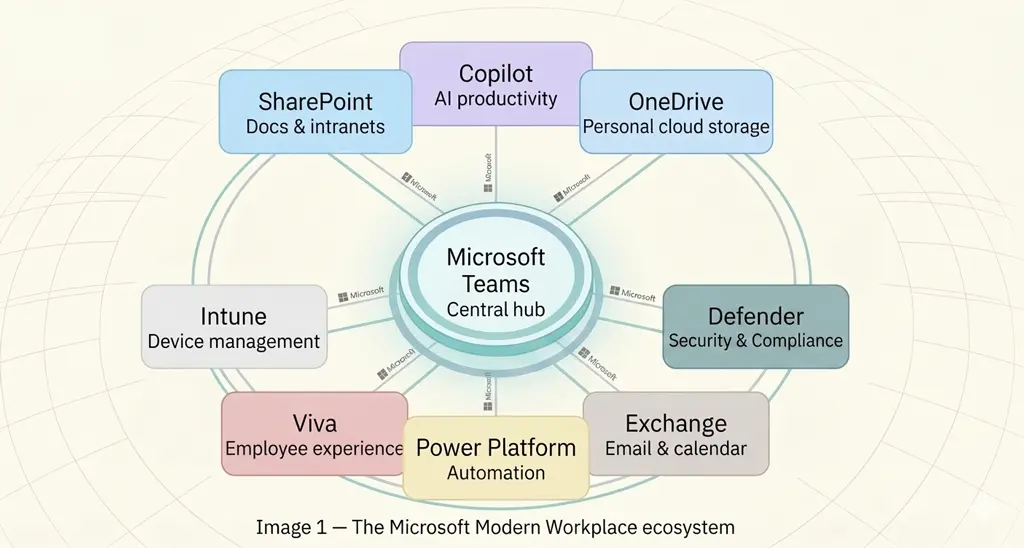
ToggleMicrosoft Modern Workplace combines Microsoft 365, Teams, SharePoint, OneDrive, Intune, Defender, Power Platform, and Copilot into a connected digital workplace replacing the need to manage disconnected tools and systems. It enables organisations to improve collaboration, strengthen security, support hybrid work, automate processes, and unlock AI-powered productivity across the business – from any device and location.
Microsoft Modern Workplace is a connected digital environment built on Microsoft 365. It is a cloud-enabled business framework which allows employees to work from wherever they are, IT teams to manage devices and data without being on-site and set-up security at the policy level rather than patched reactively when something goes wrong.
Microsoft 365 (formerly Office 365) forms the foundation of Microsoft Modern Workplace by bringing productivity, collaboration, security, device management, automation, and AI capabilities into a single cloud ecosystem.
When organisations adopt Microsoft 365 as a connected platform rather than a collection of individual applications, they gain greater visibility, stronger governance, and a more consistent employee experience.
SharePoint is the collaboration layer for content management, document collaboration, and knowledge sharing. It enables organisations to create structured document repositories, set permissions, collaborate on documents without version chaos, and search for useful information.
A SharePoint Intranet gives organisations one place to publish news, store policies, share resources, and communicate updates regardless of location. It centralises information to remove dependencies on multiple communication channels.
Hybrid work arrangements are not a temporary adjustment – they are a long-term operating model for most businesses. Microsoft modern workplace solutions help organisations support this transition effectively.
SharePoint, Teams, and OneDrive are accessible from any browser or device without any VPN tunnel for remote access.
Flexibility of multiple people editing the same Word or Excel file at the same time, with changes visible in real-time.
Cloud-hosted infrastructure helps business remain operational during disruptions like power outage, flooding, or office relocation
Usage reporting, device compliance dashboards, and security alerts give IT teams visibility into environment
Example: take a professional services firm with offices in Sydney and Melbourne can onboard a new employee through Microsoft Modern Workplace. The HR documents are in SharePoint; the onboarding tasks can run through Power Platform; meetings are scheduled in Teams; and company policies are published on the intranet. The device set up and configuration is done by Intune, and when the new hire needs to find a document or get across a long internal brief quickly, Copilot handles it. None of that requires switching between systems, the entire experience is delivered through one Microsoft ecosystem.
The organisations that get the best results from Copilot spend time on the foundation before switching it on. Here is what that preparation looks like in practice:

Step 1 – SharePoint and data environment assessment
Step 2 – Security and compliance controls
Step 3 – Pick use cases where the payoff is obvious
Step 4 – Train staff in optimal usage
Step 5 – Measure, review, and push further
Technology alone does not create a modern workplace. The organisations that achieve the strongest results treat workplace transformation as an ongoing business initiative rather than a one-time technology deployment.
Security should be a part of the workplace strategy from day 1. Enrolling devices in Intune later, multi-factor authentication, conditional access policies, and endpoint management is significantly harder than building it into the procurement and onboarding process from the start.
One of the most common reasons workplace initiatives underperform is low adoption. Sending an organisation-wide email on tools availability does not guarantee employees will use them effectively. Organisations should provide continuous training, communication programs, and ongoing feedback mechanisms to support higher adoption.
Most SharePoint environments that nobody uses were built without enough thought about how people would actually navigate them. Before migrating anything across, go through what exists, assign someone who owns each area of content, agree on how files will be named, and get rid outdated or duplicated files.
Microsoft 365 licenses are often purchased based on headcounts. Quarterly reviews catch unused licenses, identify who needs higher-tier plans, and surface tools employees did not know they had.
SharePoint governance falls apart when nobody owns information architecture. Assign site owners, set up document naming conventions early, and do a clean-up before you migrate to anything important.
As businesses expand hybrid work capabilities, cybersecurity risks continue to grow.
Having Microsoft Defender installed is not the same as having it configured. Telling employees to use strong passwords is not the same as enforcing multi-factor authentication (MFA).
The security architecture in a properly set-up of Microsoft Modern Workplace runs on a Zero Trust model. It means that the system does not automatically assume that anything on the corporate network is safe. Every access request is checked against identity, device compliance status, and context before being approved.
For businesses operating in regulated sectors like financial services, healthcare, legal, government, strong security controls are not optional. As workforces become more distributed and data moves across devices and cloud environments, businesses need consistent identity management, endpoint protection, and access controls to reduce risk and maintain compliance.
Microsoft 365 Copilot is the most significant change to how knowledge workers operate since the move from on-premises Office to cloud-based Microsoft 365. Copilot sits inside the applications people already use. It does not require switching to a new tool or learning a new interface.
Microsoft's 2025 Work Trend Index found that 53% of APAC business leaders are already using AI agents to automate business processes – the highest adoption rate globally. Additionally, 84% of APAC leaders expect AI to expand workforce capacity within the next year, highlighting how quickly organisations are moving from AI experimentation to operational deployment
What Copilot cannot do is fix a poorly organised Microsoft 365 environment. If permissions are a mess and old files are scattered across deprecated SharePoint sites, the AI will surface that mess back at users. Before the AI does anything useful, the data environment needs to be in good shape.
Implementing a Microsoft Modern Workplace involves creating an environment where – people use it, data is secure, governance holds up over time and is much more than a mere deployment checklist.
Beyond Key helps ANZ organisations across industries to design, implement, and optimise Microsoft Modern Workplace solutions tailored to their business requirements.
This includes Microsoft 365 migrations and SharePoint modernisation that do not disrupt the business, SharePoint environments that are built to be used, Teams rollouts with proper governance, and Copilot implementations that start with the data foundations first.
Whether you’re supporting a hybrid workforce, increasing workplace security, or improving AI-powered productivity, Beyond Key provides strategic technology consulting needed to build a connected, secure, and future-ready workplace.
Microsoft’s roadmap does not slow down between your deployment and your next license to renewal.
Organisations that review their Microsoft environment regularly by checking what is being used, what governance has drifted, and where employees have gone back to old habits tend to get more from the same license to spend than those that do not. The businesses that come out ahead are the ones that treat workplace technology the way they treat any other business infrastructure with scheduled maintenance, clear ownership, and the expectation that it will need attention beyond the go-live date.
Talk to our Microsoft experts to assess your current environment and create a roadmap tailored to your business goals.
A modern workplace includes cloud-based tools, flexible access, and connected systems that let people do their jobs from wherever they are with full visibility, security, or control in the process.
Microsoft Modern Workplace improves collaboration, strengthens security, reduces manual work through automation, and gives IT teams full visibility into devices and compliance. It supports hybrid workforces without compromising governance, brings communication and document management into one environment, and provides the data foundation businesses need to get real productivity gains from Microsoft 365 Copilot.
A traditional workplace consists of on-premises infrastructure, fixed locations, and disconnected tools. A modern workplace moves those capabilities to the cloud, supports remote and hybrid work by default, and integrates collaboration, security, and automation into one managed environment instead of separate systems.
The core tools are Microsoft Teams for collaboration and meetings, SharePoint for document management and intranets, OneDrive for personal cloud storage, Intune for device management, Defender for security and threat protection, Power Platform for workflow automation, Viva for employee experience, and Copilot for AI-powered productivity across Microsoft 365 applications.
A successful migration starts with assessing the current environment across data, permissions, device management, and security controls. From there, organisations typically work through identity and compliance configuration, content migration into SharePoint and OneDrive, Teams rollout with proper governance, and user adoption programs.


Falguni Puranik is a Marketing Manager at Beyond Key, with 14+ years of experience in enterprise solutions and B2B tech. She specializes in strategy, storytelling, content, and campaigns that simplify technologies like Power BI, M365, Dynamics 365, data visualization, and AI-driven transformation into real business use cases. She holds an MBA in Marketing Management
Work with a strategic IT consulting services partner that understands Australia’s modernisation, security and AI landscape.

Beyond Key Pty Ltd
Unit 605, 354 Church Street Parramattu, Sydney, NSW 2150, Australia
We acknowledge the enduring connection of Aboriginal and Torres Strait Islander peoples to the lands, waterways, and skies of Australia, pay respect to Elders past and present, and commit to a shared, inclusive future.
© 2026 Beyond Key. All rights reserved.
Falguni Puranik