The Best SharePoint-Based Employee Directory (HRD 365) with Org Chart, Advanced Search Filters & More

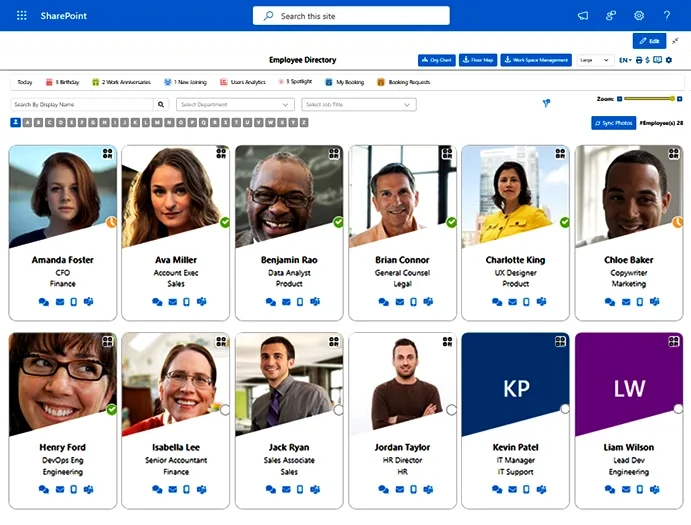
Turn fragmented employee data into a centralised SharePoint directory. Our employee directory software offers dynamic live org charts, advanced search filters, instant event alerts, and more, so your team stay connected and work smartly.  

g2-rating
4.7 on G2
Marketplace-rating
4.7 on Microsoft Marketplace
Capterra-rating
5.0 on Capterra

The HR directory trusted by 2,000+ organizations across 40 countries to keep people data clean, connected and reliable

Zeta
Birge-Held
Hammer
WordFence
Seattle-Convention-Center
AAON
Christeyns
Sughrue
Everything Your Team Needs

Everything Your Team Needs in One Advanced Employee Directory

From finding employee information in a click, auto exclusion, to role-based permission, org chart enablement, and custom branding, our employee directory software has everything you need. 

  • Keep employee profiles, presence, and work status synced in real time with Microsoft Entra ID.
  • Find people fast with advanced search, filters, org chart views, and editable profile fields.
  • Connect and act quickly with one-click chat, call, email, Teams, QR code, and export options.
  • Use it your way with SharePoint and Teams integration, custom branding, role-based access, and Excel-based org chart support.

Organizational Chart

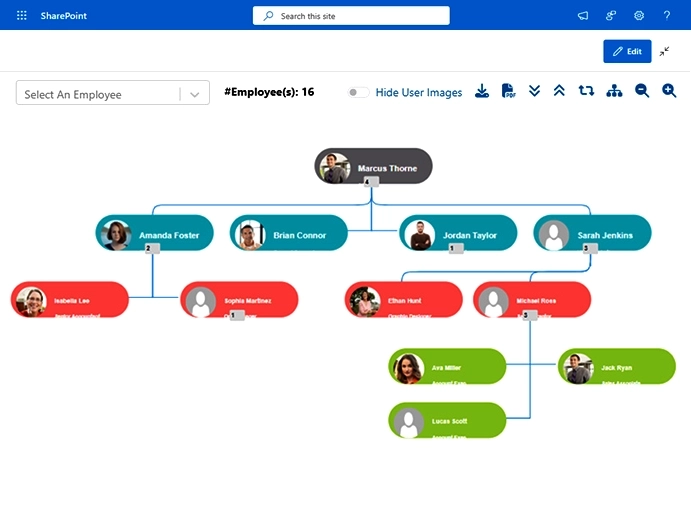
Show your team structure in a clear, live chart that updates with Microsoft Entra ID. It helps people understand roles, reporting lines, and open positions at a glance.

  • See roles, departments, reporting lines, and open positions in one view.
  • Find people fast with smart search, filters, zoom, and smooth navigation.
  • Use Excel upload, SVG/PDF export, admin controls, and a standalone web part.
Organizational Chart
Events, Engagement and Insights img

Events, Engagement & Insights

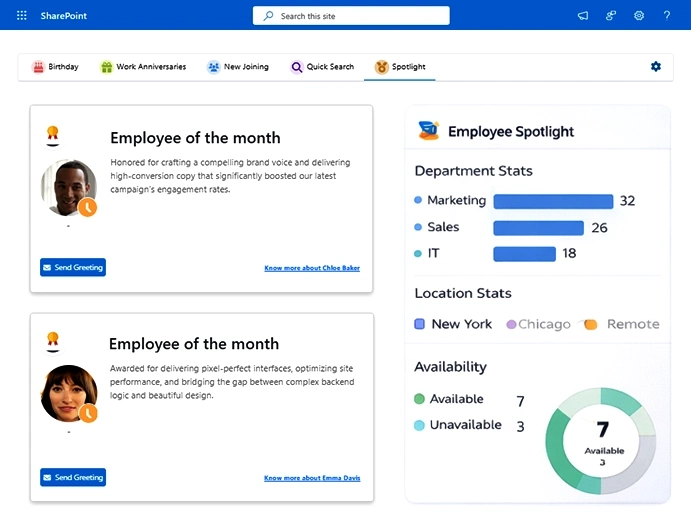
Keep your team in the loop with birthdays, anniversaries, and new joiners, all in one place. Online employee directory software also helps you recognise people and better understand engagement.

  • Auto updates for birthdays, anniversaries, and new joiners.
  • Employee Spotlight and recognition features to boost employee engagement.
  • Simple analytics for departments, locations, and availability.

Quick Search

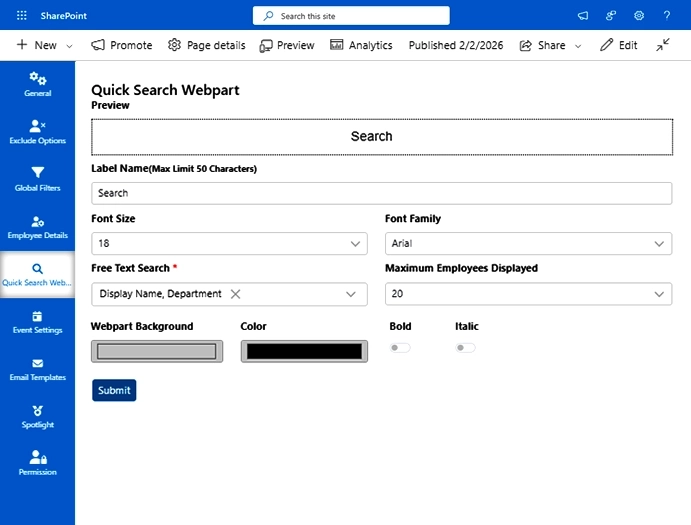
Find the right person without wasting time with corporate directory software. HRD 365 gives you a fast and simple way to search employees directly from any page.

  • Search employees easily from any page without going through multiple tabs.
  • Open employee profile directly from the page in just a few clicks.
  • Customise the search according to you and view the default user details.
Quick search img
Virtual Floor Map

Add-ons: Virtual Floor Map, Seat Booking & Employee Onboarding/Offboarding Tool

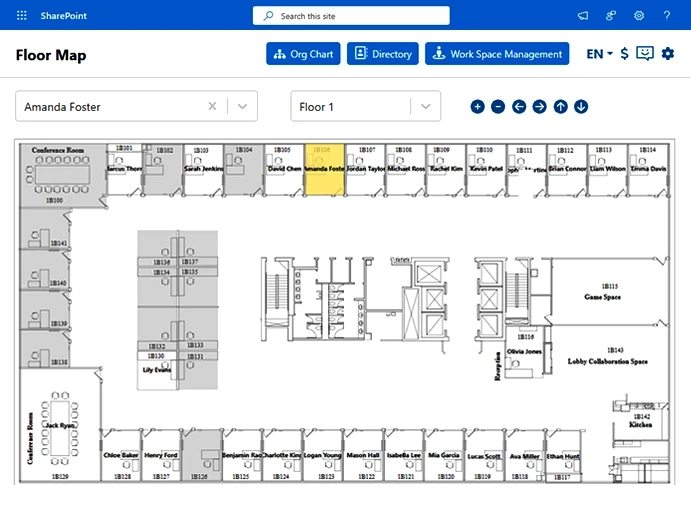
The Employee directory software provides the option to take your management a step further with Virtual Floor Maps, Desk Booking tools & Employee Onboarding/Offboarding Tool. It gives you a holistic view of where people sit and book space & smartly manage Onboarding, Crossboarding (Staff Movement), and Offboarding. 

  • Create customizable onboarding, staff movement, and offboarding form tabs.
  • View office layouts and see real-time seating & availability across floors.
  • Book desks, meeting rooms, and collaboration spaces with simple workflows.

Keep Everything Safe & Secure with Built-In Enterprise-Grade Security & Compliance.

Security

The HR directory software is built with Microsoft 356 security features, so all your data stays protected and secure.

People directory software supports GCC and GCC High standards, helping your business meet important security and compliance needs.

SOC2 Type II certification ensures secure data management and protection policies.

Keeps your employee information private and safe, allowing you to manage critical data without the risk of tampering.

Designing security, compliance, and governance

Why Australian & New Zealand Teams Choose Employee Directory (HRD 365)

The best employee directory software HRD 365 is built for modern workplaces, and fits perfectly into how organisations across Australia and New Zealand work. It helps teams stay connected, keep you compliant ready, and manage employees easily.

Real-Time Sync:

It lets you keep employee data accurate with real-time sync, so you always stay updated with new changes.

M365 Integration:

Work seamlessly inside Microsoft 365 tools, so you can work inside your familiar infrastructure.

Hybrid Work Support:

Support hybrid work with tools for visibility, communication, and workspace management.

Enterprise Grade Security:

Stay secure with enterprise-grade data protection built on Microsoft standards.

Ready to Take Your Employee Management to the Next Level with Our Employee Directory

FAQs

Does HRD 365 sync with Microsoft Entra ID?

Absolutely, the Employee Directory syncs all employee information in real time with Microsoft Entra ID/Identity, ensuring that all employee data is current and that you are kept up to speed on all new information.

Yes, the employee directory software supports advanced search and filters, including search by department, job title, location, name, and domain, so you can find anyone in just a click.

The directory includes exclusion controls that let admins hide inactive, guest, empty, so they get accurate and relatable information only and skip manually finding the active employees.

The HR directory software brings all the employee information in one place that makes it easy to manage the data and find the right person at the right time. Here are some of its key benefits:  

  • The software stores all the employee information in one place, making it easy to find.
  • It offers an org chart, so you can get a real-time organisational hierarchy synced with Entra ID.
  • Get automated notifications for birthdays, work anniversaries, and new joiners and send personalised greeting emails for greetings.
  • The software provides multiple types of analytics such as geographical analytics, department-wise analytics, and availability analytics for HR planning.
  • Even if you want to know who seating is where the employee directory software provides powerful floor mapping and seat booking Add-ons too.
  • Plus, it can be fully integrated with SharePoint, Entra ID/Identity, Power Apps, Power Automate, and Power BI.

Yes, the best employee directory software provides the most amazing feature that is the organisational chart. You can have a view of all your employees at one place with a hierarchy. This shows in which team they are, who they are working under, or if anyone has changed their team. Or if anyone has been promoted and to which position they have been promoted, everything can be viewed with the org chart.

Absolutely, you can customize it with your own logo, colours, and branding, so it looks and feels like your company’s own platform.

HRD 365 provides two most useful, advanced and productive add-ons such as Employee Onboarding/Offboarding Tool, Floor Map, and Seat Booking. Here’s a brief of the features:

Employee Onboarding/Offboarding Software: Super intuitive HR onboarding software provides new hires, smooth onboarding and offboarding experience.

Floor Mapping: This feature will help you have a holistic view of your team. You can visualise  office layouts, seatings plans, and floor maps. And know who seating is where with all relevant details.

Seat Booking: You can book a seat for any employee and notify them of its confirmation via email. Admin will have the full control to manage utilisation, policies, and layouts. You can also have a department wise color overlays with hover-based employee lookup.

Yes, HRD 365 is built with security in mind. Your data stays within your Microsoft 365 environment, and the platform is designed to keep employee information protected and private

Start your digital transformation journey.

Work with a strategic IT consulting services partner that understands Australia’s modernisation, security and AI landscape.